Is GearUP Booster legit? Yes. After digging through its tech, its track record, and the kind of player it actually helps, GearUP Booster is the most legitimate option in a space that’s mostly snake oil. It’s not a scam, but the free-trial billing flow and the missing Mac client are real flaws, and your results will depend on where you live. Here’s the full breakdown.
What GearUP Booster Actually Does
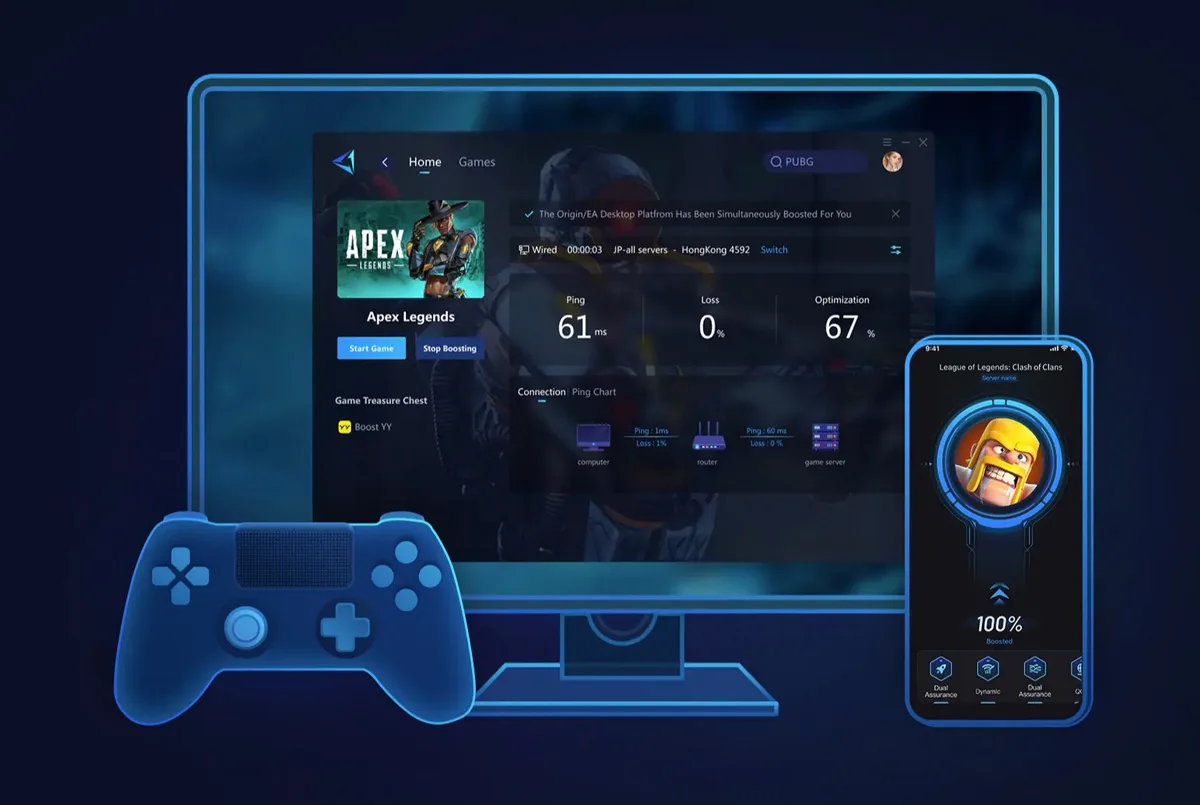
Gear UP isn’t a VPN, even though that’s the lazy comparison. It doesn’t encrypt your traffic for privacy or change your IP for streaming. What it does is intercept the network packets your game sends, then route them through a private network of optimized server nodes worldwide. If your ISP’s default path to a game server is congested, badly peered, or geographically dumb, Gear UP finds a faster one and sends your packets through that instead.
The proprietary tech stack has two pieces worth knowing about. The first is Adaptive Intelligent Routing, which dynamically switches routes mid-session if it sees congestion. The second is Anti-Packet-Loss, which sends duplicate packets along multiple paths and uses whichever copy arrives first. That second piece is the one Wi-Fi players will care about, because Wi-Fi packet loss is the silent killer of competitive sessions.
GearUP also does something every modern shooter player will appreciate. It calls it Server Migration Protection, and it’s designed for games like Call of Duty, Marvel Rivals, and EA FC that hop your session between regional servers based on matchmaking. Most boosters lose their optimization when that happens. GearUP is built to follow.
The Coverage Story
This is where GearUP separates itself from the pack. PC, Windows mobile, iOS, Android, PlayStation 4 and 5, Xbox, Nintendo Switch, Steam Deck, even Oculus Quest and Pico headsets. Console support comes through one of two paths. You either buy Gear UP’s HYPEREV gaming router, which sits between your modem and console, or you use a compatible ASUS or Reyee router that already has the GearUP plugin built in.
That console solution is the move that ExitLag, WTFast, and the rest can’t match. If you’re a PS5 or Xbox player, GearUP is essentially the only major option that can boost your traffic at the network level without sketchy DNS workarounds.
The supported game library is huge. The official site claims thousands, third-party reviews put it at 1,000-plus on PC and 2,500-plus across the HYPEREV ecosystem, and the company has formal partnerships with PUBG, Marvel Rivals, Naraka: Bladepoint, Delta Force, Arena Breakout: Infinite, and Where Winds Meet, among others. Throne and Liberty, Path of Exile 2, Black Myth: Wukong, FC25, FragPunk, Apex Legends, Valorant, League of Legends, Genshin Impact, CS2, and most of the other titles a competitive player cares about are all in there. New 2025 and 2026 mobile releases like CookieRun: Oven Smash and The Seven Deadly Sins: Origin landed quickly.
Does It Actually Lower Ping?
Here’s the honest answer. It depends almost entirely on where you live, who your ISP is, and which server you’re connecting to.
The wins users report are real. Valorant players going from 110ms to 68ms. League of Legends players holding steady at 60 to 70ms instead of 120. CS2 players knocking 60ms with packet loss down to 28ms with zero loss. Australian players finally getting playable pings on Asian and US servers. South African and MENA players who had basically no good options now hopping into European lobbies without the connection feeling like a slideshow.
The non-wins are also real. If you’re sitting on a strong fiber line in Chicago, London, or Tokyo, plugged into a nearby first-party game server with sub-30ms ping already, Gear UP isn’t going to do much for you. It might even add a little latency if the route it picks isn’t meaningfully better than yours. That’s not a knock on GearUP. It’s how routing optimization works in principle. You can’t beat physics.
The tldr is that GearUP is a tool for solving a specific problem, and if you don’t have that problem, no booster is going to invent one to fix.
The HYPEREV Router
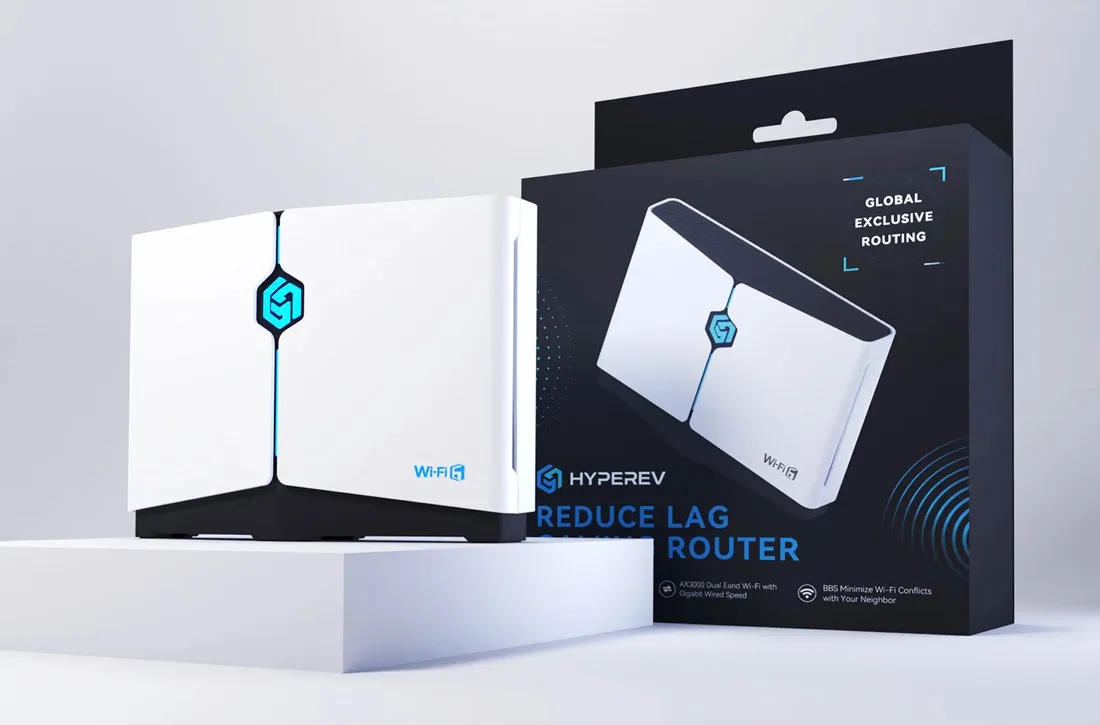
The HYPEREV deserves its own moment because it’s genuinely interesting and most reviews bury it. It’s a WiFi 6 AX3000 dual-band gaming router built around the GearUP optimization stack, which means console traffic gets boosted at the network layer without any software install on the console itself. It comes bundled with a 90-day VIP plan and a month of Discord Nitro, and it’s currently sitting in the $40 to $80 range depending on the sale.
For a PS5 or Xbox player who’d otherwise have no real option, that’s the cheapest path to legitimate network optimization on console hardware. Worth knowing about even if you ultimately decide it’s not for you.
Pricing and the Free Trial
Gear UP runs $9.99 monthly, $24.99 quarterly, or $79.99 annually on PC. The annual plan works out to about $6.67 a month, which is competitive with ExitLag and cheaper than WTFast. Mobile pricing varies by region, generally between $4.49 and $9.99 a month.
There’s a 3-day full-access free trial, which sounds great, but read the fine print. It often requires a payment method on file, and if you don’t cancel before it ends, you get auto-charged. Apple App Store reviews are full of people who got billed and then struggled to get refunds. The cancellation flow goes through Profile, then Help Center, then Feedback, and it’s not the slickest process. If you’re going to test it, set a calendar reminder for day two.
There’s also no clean money-back guarantee on subscriptions. The 30-day defect coverage applies to the HYPEREV hardware, but software refunds are case-by-case. Compare that to ExitLag’s clearer 7-day money-back policy and it’s a fair gripe.
Who’s Behind It
GearUP Portal Pte. Ltd. is registered in Singapore at 1 Raffles Quay, incorporated in October 2022. The team is global, with people across Italy, France, Ireland, the US, and Canada. Microsoft Store Europe has given it editorial recommendations, ASUS has integrated the plugin into selected routers (including official documentation on the ASUS support site), and the company has esports sponsorships with TSM and a presence at Milan Games Week and Comicon Naples.
For a category that has more than its share of fly-by-night operators, that’s a strong legitimacy profile. The Trustpilot rating sits at 5 out of 5 across roughly 2,900 reviews, which is the highest in the category. GearUP does actively prompt customers to leave Trustpilot reviews, so factor that in, but the volume and the consistency of the praise are hard to dismiss.
Where It Falls Short
The Mac situation is the biggest gap. There’s no native Mac client in 2026. You’re running BlueStacks emulation or going the router route. For a Singapore-based, globally distributed company in 2026, that’s a strange omission.
The free-trial billing flow is the second problem. It’s not a scam, but it’s friction that didn’t need to be there.
The third one is the gap between marketing and product. GearUP is a network optimization tool. It will not boost your FPS, fix a weak Wi-Fi signal, upgrade your CPU, or solve a hardware bottleneck. The branding sometimes implies a broader “boost” than the product actually delivers, and casual players who buy it expecting a magic fix walk away disappointed. That’s not GearUP’s fault, but it’s worth saying out loud.
Last one. There hasn’t been a tier-one independent benchmark from PCMag, Tom’s Guide, Wired, or any of the major outlets. The data we have is anecdotal, user-reported, and from second-tier review sites. That’s not damning, but it’s worth knowing.
Who Should Actually Use It
If you live in Australia, New Zealand, South Africa, Southeast Asia, the Middle East, South America, India, Eastern Europe, or anywhere else with limited local game servers, GearUP is genuinely going to change how your games feel. Same goes for cross-region squads, where one friend is in LA and another is in Manila and you want a server that’s playable for both.
Console players on PS5, Xbox, or Switch should look at the HYPEREV bundle. There’s nothing else in the category that solves console boosting at the hardware level for that price.
Mobile competitive players, especially Call of Duty Mobile, PUBG Mobile, Mobile Legends, and Wild Rift, will benefit from the dual-channel Wi-Fi plus cellular acceleration. That’s another feature most competitors don’t offer at all.
Twitch Drops collectors get a real bonus. GearUP automates Drops collection without keeping a browser open, which is a small thing that nobody else does and the kind of detail that tells you the team actually plays the games they’re optimizing for.
Skip it if you’re on a strong local fiber connection with sub-30ms ping to the servers you play on, if you only play single-player games, if you’re a Mac purist, or if you’re expecting a hardware-level performance boost rather than a network-level one.
Where I Land
GearUP Booster is the most legitimate game booster operating in 2026, with the broadest platform coverage, the only credible console solution in the category, and a publisher partnership list that gives it a real moat. The free-trial billing and the missing Mac client are real flaws, and the results vary wildly based on where you live. But for the players it’s actually built for, it does what it says it does, and it’s priced fairly.
If you fit the profile, the annual plan at $79.99 is a smarter buy than the monthly. If you’re on console, the HYPEREV bundle is the move. And if you’re on a fast local fiber line in a major North American or European city, save your money for a better headset.
Questions People Ask About GearUP Booster
Is GearUP Booster legit?
Yes. GearUP Portal Pte. Ltd. is a real company registered in Singapore and incorporated in October 2022, with a global team across Italy, France, Ireland, the US, and Canada. ASUS integrates its plugin into selected routers, Microsoft Store Europe has given it editorial recommendations, and it holds formal partnerships with publishers including PUBG and Marvel Rivals, plus esports sponsorships with TSM. Its Trustpilot rating is 5 out of 5 across roughly 2,900 reviews.
Is GearUP Booster a scam?
No, but two things deserve scrutiny. The 3-day full-access free trial often requires a payment method on file and auto-charges if you don’t cancel in time, and Apple App Store reviews include people who were billed and struggled with refunds. There is also no clean money-back guarantee on software subscriptions; refunds are case-by-case. Neither is a scam, but both are friction worth knowing about before you sign up.
Does GearUP Booster actually work?
It depends on your connection. Players far from game servers see real results: Valorant players report drops from 110ms to 68ms, and Australian, South African, and MENA players get playable pings on distant servers for the first time. But if you’re on strong fiber in a major city with sub-30ms ping to nearby servers, it won’t do much and can occasionally add latency. It solves routing problems; it can’t beat physics.
How much does GearUP Booster cost?
On PC it runs $9.99 per month, $24.99 per quarter, or $79.99 per year, which works out to about $6.67 a month on the annual plan. Mobile pricing varies by region, generally $4.49 to $9.99 a month. The HYPEREV gaming router bundle, the console player’s best option, sits in the $40 to $80 range depending on the sale.


